
Detailed Tivi-Live IPTV overview covering channels, streaming quality, pricing plans, device support, setup process, payment methods, customer service, FAQs.
What is Tivi-Live IPTV?
Tivi-Live IPTV is an internet-based television streaming service that delivers live TV channels, movies, and on-demand content through IPTV technology. Unlike traditional cable or satellite TV, Tivi-Live relies on a stable internet connection to stream content directly to compatible devices. It is designed for users who want flexible access to entertainment without long-term cable contracts or bulky hardware installations.
The service supports a wide range of devices, making it suitable for households that use Smart TVs, Android devices, Firestick, PCs, or mobile phones. With its emphasis on affordability and convenience, Tivi-Live IPTV aims to serve users seeking a modern alternative to traditional television services.
Features
Tivi-Live IPTV offers a variety of features intended to enhance the viewing experience:
- Extensive lineup of live TV channels across entertainment, sports, news, and international categories
- Video on Demand (VOD) library with movies and TV series
- High-definition and Full HD streaming quality (subject to internet speed)
- Compatibility with popular IPTV player applications
- Electronic Program Guide (EPG) support for easier channel navigation
- Multiple device compatibility under supported plans
Pros and Cons
Pros:
- Broad selection of live TV channels
- Affordable subscription plans compared to cable TV
- Supports many popular streaming devices
- Simple setup process for beginners
Cons:
- Requires a stable and fast internet connection
- Streaming quality may vary depending on location
- Limited transparency on content licensing
- No guaranteed free trial on all plans
Subscription Price
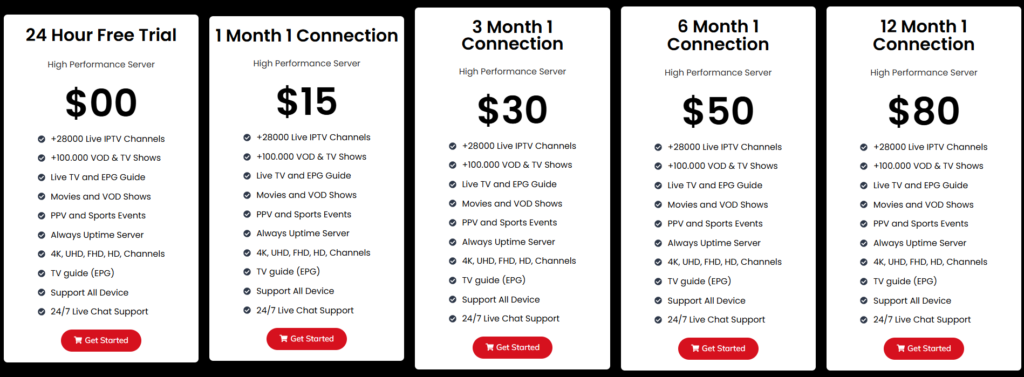
| Plan | Duration | Connections | Price |
|---|---|---|---|
| Basic | 1 Month | 1 | $15 |
| Standard | 3 Months | 1 | $30 |
| Plus | 6 Months | 1 | $50 |
| Premium | 12 Months | 1 | $80 |
Installation Guide
Setting up Tivi-Live IPTV is straightforward and does not require technical expertise:
- Choose a supported device such as a Smart TV, Android box, Firestick, smartphone, or PC
- Install a compatible IPTV player application
- Enter the login credentials or playlist details provided after subscription
- Load channels and refresh the Electronic Program Guide
- Begin streaming live TV and on-demand content
Most users can complete the setup process within a few minutes.
Payment Method
Tivi-Live IPTV supports multiple payment methods to accommodate different users. Commonly accepted options include credit or debit cards, digital payment gateways, and sometimes cryptocurrency. Available payment methods may change, so users should verify accepted options during checkout.
Customer Service
Customer service is typically available through email or ticket-based support systems. The service handles inquiries related to subscriptions, payments, and basic technical concerns. Response times can vary depending on the volume of requests and the support channel used.
Customer Support
Customer support focuses on helping users with:
- Initial setup and configuration
- Resolving streaming or buffering issues
- Subscription renewals and account questions
While support is functional, response speed and availability may not always be consistent, especially during peak times.
Alternatives
Conclusion
Tivi-Live IPTV presents a practical solution for users looking to transition away from traditional cable television. With its wide device compatibility, affordable pricing structure, and diverse channel offerings, it can meet the needs of many viewers. However, performance depends heavily on internet quality, and users should be aware of potential regional limitations. Overall, Tivi-Live IPTV is a solid choice for budget-conscious users seeking flexible streaming access.
FAQ’s
1. What devices support Tivi-Live IPTV?
Smart TVs, Android devices, Firestick, mobiles, and PCs.
2. What internet speed is needed?
At least 15 Mbps for smooth streaming.
3. Can I use multiple devices?
Yes, depending on your subscription plan.
4. Is setup difficult?
No, setup is quick and beginner-friendly.
5. What if channels buffer?
Check internet speed or contact support.

