
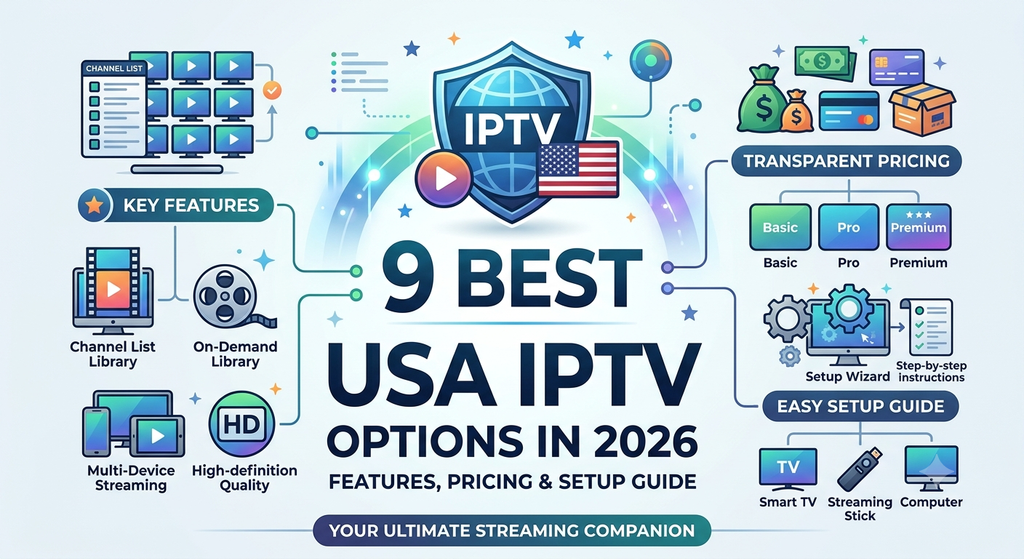
Discover the 9 best USA IPTV options in 2026. Compare features, pricing, device compatibility, setup steps, safety tips, and streaming quality.
Introduction: Find the Best USA IPTV for Your Streaming Needs
The way Americans watch television has changed dramatically. Traditional cable packages are no longer the only option for viewers who want live television, sports, movies, news, entertainment, and on-demand content in one place. Internet-based streaming has created new opportunities for households looking for more flexibility, convenient access, and greater control over their entertainment budgets.
If you are searching for the best USA IPTV options in 2026, understanding the differences between IPTV players, licensed streaming platforms, and independent IPTV providers is essential. The right solution should offer reliable playback, useful features, device compatibility, transparent pricing, responsive customer support, and clear information about content licensing.
IPTV stands for Internet Protocol Television. It describes the delivery of television content through internet networks rather than exclusively through conventional cable or satellite infrastructure. Depending on the provider, IPTV services can include live television channels, catch-up programming, video-on-demand libraries, electronic program guides, and other streaming features.
However, not every product marketed as an IPTV service provides the same experience. Some applications simply play compatible media streams supplied by the user, while other platforms offer complete subscriptions with licensed channels and professionally managed content libraries. Understanding this distinction can help you avoid confusing applications, unexpected fees, unreliable streams, and potentially unauthorized content.
What Is IPTV and How Does It Work?
IPTV, or Internet Protocol Television, delivers television programming using internet protocol networks. Instead of depending entirely on a traditional cable connection or satellite dish, viewers access supported content through an internet-connected device.
Depending on the platform, programming may be delivered through live streaming, scheduled broadcasts, replay features, or on-demand video.
Understanding the Three Main IPTV Formats
Live IPTV: Live IPTV delivers television programming in real time. Examples include live news, sports broadcasts, and entertainment channels available through licensed streaming subscriptions.
Video on Demand (VOD): VOD allows users to select available movies, television episodes, and other content whenever they want, subject to the service’s subscription and viewing rights.
Time-Shifted Television: Time-shifted features allow viewers to watch selected programs after their original broadcast. Depending on the provider, this may include catch-up television, replay, or cloud-based recording.
IPTV Service vs. IPTV Player
These two terms are often confused, but they describe different products.
An IPTV service supplies access to television content and manages the associated streaming infrastructure and licensing arrangements. An IPTV player is software that plays compatible streams or media sources.
For example, a player may provide a channel-list interface, playback controls, playlist management, subtitles, and an electronic program guide. However, the player may not include television channels or provide any content subscription itself.
Before purchasing an IPTV subscription, determine exactly what is included. A polished application does not automatically mean the underlying content is licensed, reliable, or included in the purchase price.
Why Is IPTV Popular in the USA?
Internet television appeals to American households for several reasons:
- Flexible viewing: Watch supported content on compatible devices without relying exclusively on a conventional television connection.
- Multiple device options: Depending on the platform, viewers can use smart TVs, streaming devices, smartphones, tablets, and computers.
- Convenient navigation: Electronic program guides, search tools, favorites, and personalized recommendations can make finding content easier.
- Different subscription models: Viewers can compare monthly subscriptions, channel packages, and on-demand services to find a suitable combination.
- Internet-based access: Many platforms can be used wherever the subscription, device, and network requirements are satisfied.
The most important consideration is choosing a service that matches your viewing habits while providing transparent pricing, dependable performance, and legitimate access to the content you want.
What Is Mediaspelare?
Mediaspelare is a term associated with a media player; in Swedish, mediaspelare means “media player.” In an IPTV context, the term may refer to software or a device used to play digital media and compatible television streams.
If you are researching a particular product or brand called Mediaspelare, check its official documentation to confirm its exact features, subscription model, supported devices, and content arrangements. The name alone does not establish whether it is an IPTV provider, a playback application, or a hardware product.
Common Features of an IPTV Media Player
A capable media player may provide several useful features.
1. Playlist Management
Compatible players can allow users to import, organize, or update supported playlists. Supported formats vary by application, so checking compatibility before purchasing is important.
2. Electronic Program Guide
An electronic program guide, or EPG, displays available programming information in a structured interface. Depending on the source, it may show program titles, schedules, descriptions, and current broadcasts.
3. Search and Favorites
Search functions help users locate channels or media quickly, while favorites can simplify access to frequently watched content.
4. Playback Controls
Depending on the application, playback features may include pausing, seeking, subtitle selection, aspect-ratio adjustment, and audio-track selection.
5. Multi-Device Compatibility
Some players work across several operating systems, while others are designed for specific smart-TV platforms or streaming devices.
Does a Media Player Include Channels?
Not necessarily. Some players are software-only products and do not supply television channels, movies, or sports programming. Users may need a separate, authorized content subscription.
Always verify whether the advertised price covers the application, the content subscription, or both. This simple check can prevent unexpected expenses and confusion during setup.
Key Features to Look for in the Best USA IPTV
Choosing the best USA IPTV solution requires more than counting channels. A service advertising thousands of channels may still be unsuitable if its streams are unreliable, its licensing is unclear, or its application is difficult to use.
The following features deserve careful evaluation.
3.1 Reliable Streaming Quality
Streaming quality should be one of your highest priorities. Look for services that explain their supported resolutions, internet requirements, device limitations, and performance expectations.
Full HD and 4K support can improve picture quality, but resolution labels alone do not guarantee a consistently sharp image. Actual quality also depends on the source, compression, available bandwidth, display, and network conditions.
3.2 Live TV and On-Demand Content
Think about what you watch most often. Some households prioritize local news and live sports, while others prefer entertainment, movies, documentaries, or family programming.
Check the actual channel lineup and on-demand catalog before subscribing. Availability may vary by region, subscription tier, broadcasting rights, and device.
3.3 Electronic Program Guide
A useful EPG makes browsing live television much easier. Ideally, the interface should display readable program titles, accurate schedules, channel information, and a clear view of upcoming content.
Program information may depend on the provider’s data source, so verify that the guide is maintained and compatible with your device.
3.4 Simple Navigation
An intuitive interface is especially valuable for households with multiple users. Clear menus, responsive search, organized categories, and accessible playback controls can make daily viewing more convenient.
3.5 Device Compatibility
Before subscribing, confirm compatibility with your exact device model and operating-system version. A service that works on Android TV may not necessarily offer a native application for every Samsung or LG smart TV.
3.6 Transparent Pricing
The best subscription is not automatically the cheapest one. Consider the complete cost, including taxes where applicable, application fees, hardware purchases, premium add-ons, and renewal charges.
Avoid plans that advertise unusually large content libraries without explaining licensing, service limitations, or refund policies.
3.7 Customer Support
Look for a provider that offers accessible support channels, clear troubleshooting instructions, billing assistance, and published service policies.
A transparent provider should explain how customers can report technical problems and request cancellation or refunds when eligible.
3.8 Security and Privacy
Review the provider’s privacy policy, payment methods, account-security practices, and application permissions. Install applications from official stores or verified developer sources whenever possible.
Avoid sharing account credentials with strangers or installing unknown files simply because a seller promises additional channels.
Device Compatibility: Which Devices Support IPTV?
One of IPTV’s main advantages is its ability to work across different connected devices. Nevertheless, support varies between services and applications.
| Device | Compatibility considerations | Best use |
|---|---|---|
| Amazon Fire TV devices | Check the app’s official availability and installation requirements | Television streaming |
| Android TV and Google TV | Verify app support for the specific operating system | Living-room entertainment |
| Samsung Smart TV | Confirm support for the TV model, operating system, and app store | Native smart-TV viewing |
| LG Smart TV | Check model-specific application availability | Convenient television access |
| Apple TV | Use compatible apps and supported subscription services | Home entertainment |
| Android smartphones | Confirm the app’s Android version requirements | Mobile viewing |
| iPhone and iPad | Check App Store availability and service restrictions | Portable streaming |
| Windows computers | Use a supported application or authorized web player | Desktop viewing |
| Mac computers | Check browser or application compatibility | Computer-based entertainment |
Can You Use IPTV on Multiple Devices?
Some subscriptions allow multiple devices, but simultaneous viewing and installation limits vary. A plan may permit installation on several devices while restricting how many can stream at the same time.
Read the provider’s terms before purchasing a multi-device package. Do not assume that a subscription advertised as compatible with multiple devices automatically includes multiple simultaneous streams.
What Internet Speed Do You Need?
The ideal connection depends on video resolution, compression, household network usage, and the requirements of the chosen service.
As a practical starting point, many viewers aim for approximately 5–10 Mbps per HD stream and 15–25 Mbps or more per 4K stream. These are general planning estimates, not guarantees or universal minimums.
For a more reliable experience:
- Use a stable broadband connection.
- Position the router away from obstructions when possible.
- Connect stationary streaming devices through Ethernet if practical.
- Reduce competing downloads during important live broadcasts.
- Test the connection near the television, rather than relying only on a speed test performed elsewhere in the home.
A fast internet plan cannot compensate for every problem. Congested networks, weak Wi-Fi, overloaded servers, and poor source quality can still affect playback.
Pricing Plans: How Much Does USA IPTV Cost?
IPTV pricing varies considerably. A media player may charge a one-time or recurring software fee, while a licensed live-TV service generally charges a subscription for access to its programming.
There is no single standard price for every IPTV product. The table below provides an illustrative comparison of pricing structures, not verified quotes from individual providers.
| Plan type | Typical billing structure | What to check |
|---|---|---|
| Free, ad-supported streaming | No subscription fee for eligible content | Advertisements, available channels, and geographic restrictions |
| IPTV player application | Free, one-time purchase, or recurring software fee | Whether content is included separately |
| Basic live-TV subscription | Monthly recurring payment | Included channels, local stations, and limitations |
| Expanded live-TV package | Higher monthly subscription | Sports, entertainment, and premium networks |
| Premium streaming bundle | Monthly payment or bundled subscription | Included services, ads, and renewal terms |
| Annual software plan | Upfront yearly payment | Renewal date, cancellation rules, and refund eligibility |
| Multi-user subscription | Monthly or annual payment | Simultaneous streams and household restrictions |
How to Compare Subscription Value
A strong buying decision should be based on the total cost of watching your preferred content.
Consider these questions before subscribing:
- Does the package include the channels you watch regularly?
- Are local channels available in your area?
- Are sports broadcasts subject to regional restrictions?
- Is the media player included in the subscription?
- Are additional devices or simultaneous streams charged separately?
- Does the advertised price apply only to the introductory period?
- Can you cancel online, and are refunds available under the stated terms?
Is Cheap USA IPTV Worth It?
A lower monthly price can be attractive, but cost should never be the only deciding factor. Extremely cheap offers that promise extensive premium programming without clearly explaining authorization deserve additional scrutiny.
A legitimate service should provide understandable terms, accurate package information, and a reasonable explanation of how customers receive access to the advertised content.
Compare the final monthly cost against reliability, customer support, privacy protections, and content availability. Paying slightly more for a transparent and dependable service may provide better long-term value than repeatedly replacing an unreliable subscription.
Setup Process: How to Install IPTV Step by Step
Setting up IPTV is usually straightforward when you select a compatible application and an authorized content source.
Exact instructions vary by device and provider, but the following process covers the main steps.
Step 1: Choose a Suitable IPTV Service
Identify your priorities before selecting a subscription. You may want local television, live sports, family entertainment, international programming, or on-demand movies.
Review the provider’s content rights, subscription terms, device compatibility, and cancellation policy.
Step 2: Check Your Device Requirements
Confirm that your smart TV, streaming device, smartphone, tablet, or computer meets the application’s published requirements.
Check available storage, operating-system version, network connectivity, and regional app availability.
Step 3: Install the Official Application
Download the application from the device’s official app store or a verified developer source.
Avoid unfamiliar download websites, modified application packages, and files that request unnecessary permissions.
Step 4: Create an Account or Activate Your Subscription
Follow the provider’s official instructions to register or sign in. If payment is required, confirm the amount, renewal frequency, and refund terms before completing the purchase.
Never send your password, payment-card details, or private account credentials to an unknown seller through an informal messaging service.
Step 5: Connect the Authorized Content Source
Depending on the product, you may need to sign in to your streaming account, activate your device, or connect a compatible playlist that you are authorized to use.
Some IPTV players do not supply channels automatically. Follow the application’s official documentation rather than assuming a separate subscription is unnecessary.
Step 6: Configure the Program Guide
If your service supports an EPG, follow its instructions to load or synchronize the available program information.
Check time-zone settings, channel labels, and program schedules if the guide appears inaccurate.
Step 7: Test Streaming Quality
Play a few channels or programs and evaluate startup time, picture quality, audio synchronization, and stability.
Test at different times of day if possible. This can help you distinguish a device problem from temporary network congestion.
Step 8: Secure Your Account
Use a strong, unique password and enable available security protections. Keep the application updated and review account settings periodically.
If you no longer need a subscription, use the provider’s official cancellation process and retain any relevant confirmation.
Streaming Performance: What Affects IPTV Quality?
Streaming performance is one of the most important factors when comparing USA IPTV options. A large channel catalog is of limited value if programs repeatedly freeze, take too long to load, or display poor-quality video.
Internet Connection Stability
Bandwidth matters, but consistency matters too. A connection with sufficient download speed may still struggle when latency, packet loss, or Wi-Fi interference causes interruptions.
For important live events, a stable wired connection can be more dependable than a weak wireless signal.
Server Capacity and Content Delivery
The provider’s infrastructure affects how efficiently video reaches viewers. Capacity limitations and network congestion can cause buffering, particularly when many people watch the same popular event.
Ask providers about service status information and technical support rather than relying solely on promotional claims.
Video Resolution and Compression
Higher resolutions require more data under comparable conditions. Efficient compression can reduce bandwidth requirements, but the source quality and encoding method also affect the result.
A service claiming 4K output may not deliver consistently native 4K content across every channel. Confirm which channels or programs actually support the advertised resolution.
Device Performance
Older devices, outdated applications, limited storage, and background processes may interfere with smooth playback.
Restarting a device, updating its software, and closing unnecessary applications can resolve some problems. Persistent failures may require help from the provider.
How to Reduce Buffering
- Restart your router and streaming device when appropriate.
- Test your connection using a reliable speed-testing service.
- Move the device closer to the router or use Ethernet.
- Pause bandwidth-intensive downloads on other devices.
- Update the streaming application and device operating system.
- Try another supported stream to determine whether the issue affects one source or the entire service.
- Contact official support if the problem continues.
Important: Buffering is not always caused by your internet provider. Problems can originate from the streaming source, the application, the device, or the service’s infrastructure.
Customer Support: What Should a Good IPTV Provider Offer?
Customer support is easy to overlook when comparing subscriptions, but it becomes essential when payments fail, channels disappear, or applications stop working.
A professional service should explain how to obtain help and what customers can reasonably expect.
Important Support Features
Clear troubleshooting resources: Setup guides, compatibility information, frequently asked questions, and solutions for common playback issues.
Accessible contact options: Official email, support tickets, live chat, or telephone assistance, depending on the provider.
Billing transparency: Clear explanations of renewals, cancellations, charges, and refund eligibility.
Service notifications: Updates about planned maintenance, technical incidents, or known outages where applicable.
Account security: A safe process for resolving login issues without asking customers to reveal passwords.
Red Flags to Avoid
Be cautious when a seller provides no verifiable business information, refuses to explain licensing, demands unusual payment methods, or promises guaranteed access to every premium channel.
Other warning signs include aggressive sales tactics, unclear renewal policies, no written refund terms, and requests to disable device security protections.
Before paying for a subscription, check the provider’s official website, customer policies, and independently available reputation information.
Pros and Cons of IPTV in the USA
Internet television can be convenient, but it is not ideal for every household.
| Pros | Cons |
|---|---|
| Flexible viewing across supported devices | Requires a reliable internet connection |
| Access to live and on-demand content through eligible services | Content availability varies by subscription and location |
| Convenient search and program-guide features | Some applications require a separate content subscription |
| Potential alternatives to traditional cable packages | Premium live-TV services can still be expensive |
| Multiple subscription and ad-supported models | Network congestion can affect playback |
| Portable viewing where service terms permit it | Some content may be subject to regional restrictions |
| Easy account management on many platforms | App compatibility differs between devices |
Who Benefits Most From IPTV?
IPTV may be a strong option for viewers who prefer internet-based entertainment, want access across supported devices, or want to compare streaming subscriptions with traditional cable.
It can also work well for households that want to combine free ad-supported channels with one or more paid services.
However, viewers with unreliable broadband or a strong preference for a single traditional television package may find another option more practical.
Comparison Table: 9 Best USA IPTV Options to Consider
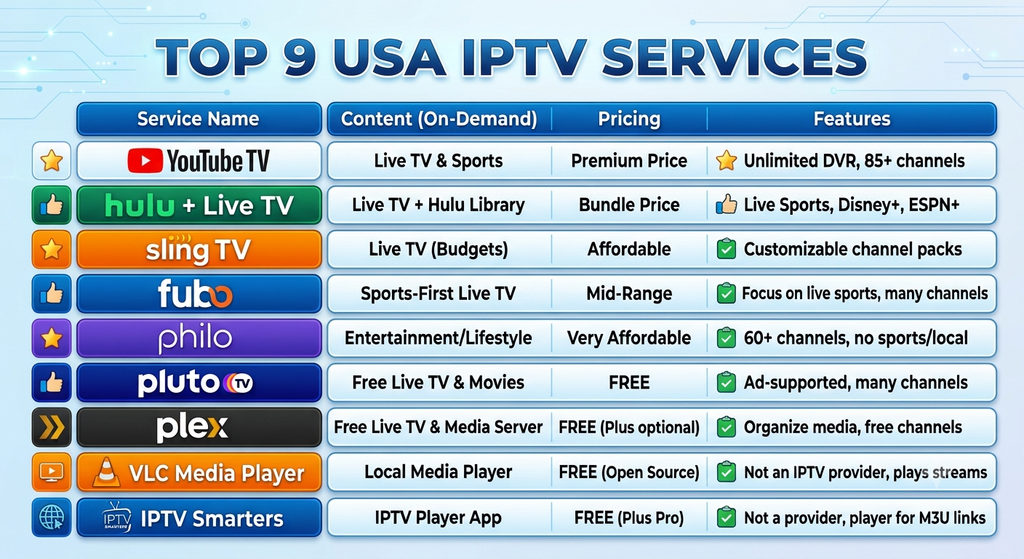
The following list combines established internet-TV services and IPTV playback software. These are different categories, so compare them according to what they actually provide.
This is a practical shortlist, not a claim that every product is identical or that one provider is universally the best. Features, channel lineups, regional availability, and pricing can change.
| No. | Service or platform | Category | Best for | Main consideration |
|---|---|---|---|---|
| 1 | YouTube TV | Live-TV streaming | Broad live-TV viewing | Subscription cost and regional channel availability |
| 2 | Hulu + Live TV | Live TV and on-demand bundle | Viewers wanting live television alongside on-demand entertainment | Bundle details, ads, and channel lineup |
| 3 | Sling TV | Live-TV streaming | Viewers who want to compare smaller channel packages | Local channels and add-on costs |
| 4 | Fubo | Live-TV streaming | Sports-oriented households | Sports rights, regional availability, and price |
| 5 | Philo | Entertainment-focused live TV | Viewers prioritizing entertainment and lifestyle channels | Limited sports and local broadcast coverage |
| 6 | Pluto TV | Free, ad-supported streaming | Budget-conscious viewers | Advertising and channel selection |
| 7 | Plex | Media platform and player | Personal media organization and supported streaming features | Features vary by product and region |
| 8 | VLC Media Player | General-purpose media player | Playing compatible local media and supported streams | Does not provide a subscription channel lineup |
| 9 | IPTV Smarters | IPTV player application | Users with a compatible, authorized IPTV subscription | Content access depends on the service and supported setup |
1. YouTube TV
YouTube TV is a live-TV streaming option for viewers who want access to a selection of television networks over the internet.
It may suit households seeking a familiar interface and live programming without a conventional cable television package. Channel availability, local stations, simultaneous streams, and other features depend on the current subscription terms.
Best for: Viewers looking for a dedicated live-TV streaming subscription.
2. Hulu + Live TV
Hulu + Live TV combines live television with on-demand entertainment under its current package structure.
Its appeal is the opportunity to access live channels and eligible on-demand content through a single subscription. Check the latest bundle inclusions, advertisements, supported devices, and regional channel availability before purchasing.
Best for: Households interested in combining live television with on-demand programming.
3. Sling TV
Sling TV offers a live-TV streaming model that lets customers compare available packages and add-ons.
It may appeal to viewers who want to focus on selected channel categories rather than automatically purchasing the largest possible bundle. However, the best package depends on which channels are currently included and whether local stations are available in your area.
Best for: Viewers comparing more selective live-TV packages.
4. Fubo
Fubo is a live-TV streaming platform associated with a strong sports-oriented offering, although its full lineup and rights vary by package and region.
Sports fans should verify specific leagues, channels, blackout restrictions, and event availability before subscribing. A general sports focus does not guarantee access to every sporting event.
Best for: Households that prioritize sports programming and related television channels.
5. Philo
Philo focuses primarily on entertainment and lifestyle-oriented television programming.
It may be worth considering if your viewing habits center on entertainment channels rather than comprehensive local news or sports coverage. Check the current channel list and subscription details to confirm that your preferred networks are included.
Best for: Viewers seeking entertainment-focused live television.
6. Pluto TV
Pluto TV provides free, ad-supported streaming channels and on-demand content in supported regions.
It can be an attractive starting point for people who want to explore internet television without immediately paying for a monthly subscription. The trade-offs include advertising, a curated selection of channels, and content that differs from paid live-TV packages.
Best for: Budget-conscious viewers seeking free streaming entertainment.
7. Plex
Plex is a media platform that can help users organize and play personal media and access supported streaming features.
It should not be confused with a universal paid IPTV subscription. Available content and features depend on the product, supported services, and current regional offerings.
Best for: Users interested in media organization and compatible streaming features.
8. VLC Media Player
VLC is a general-purpose media player known for supporting a wide variety of media formats and compatible streaming sources.
It is useful when you need a flexible player for supported media, but it does not automatically supply a licensed package of American television channels.
Best for: Users who need a versatile player for compatible media and streams.
9. IPTV Smarters
IPTV Smarters is a media-player application associated with IPTV playback workflows. Actual features, availability, and supported connection methods depend on the application version and device.
Users should verify the official application source and ensure that any connected playlist or service is authorized. The presence of a player interface does not establish that a separate content provider has the rights to distribute its channels.
Best for: Users who already have access to a compatible, authorized IPTV source.
Which Option Should You Choose?
If you want a full live-TV subscription, compare YouTube TV, Hulu + Live TV, Sling TV, Fubo, and Philo according to your preferred channels and budget.
If you prefer free, ad-supported programming, explore Pluto TV. If you need a media player rather than a subscription service, consider Plex, VLC, or a compatible IPTV player.
The most suitable option depends on content availability, licensing, pricing, device compatibility, and the type of viewing experience you want.
Is USA IPTV Safe and Legal?
Safety and legality are essential considerations when choosing the best USA IPTV service.
IPTV technology itself is not inherently illegal. The important questions concern the content being distributed, the rights held by the provider, applicable licensing arrangements, and compliance with relevant laws.
A recognizable brand name, professional website, large channel list, or low subscription price does not independently prove that a service is authorized.
How to Identify a More Trustworthy Service
Before subscribing, look for:
- A verifiable official website and identifiable provider.
- Clear information about the channels and content included.
- Transparent subscription, renewal, cancellation, and refund terms.
- A privacy policy explaining how account information is handled.
- Secure payment processing and sensible account protections.
- Official application downloads or verified distribution channels.
- Support documentation and a practical way to contact the provider.
Common IPTV Safety Risks
Unverified IPTV services may expose customers to financial scams, misleading offers, unwanted software, privacy risks, or unauthorized content distribution.
Avoid services that request excessive permissions, encourage you to install unknown files, demand that you disable device protections, or require sensitive information through insecure channels.
Use strong passwords, keep your device updated, and review your payment statements for unexpected recurring charges.
Can a VPN Make Any IPTV Service Legal?
No. A virtual private network can help encrypt traffic between your device and the VPN endpoint, depending on its configuration, but it does not grant broadcasting rights or make unauthorized content distribution lawful.
VPN use can also be subject to a streaming provider’s terms and regional restrictions. Choose services with appropriate content rights and follow their applicable terms of use.
A Practical Safety Checklist
Before entering payment details, confirm who operates the service, what you are buying, which devices are supported, and how to cancel.
If a provider claims to offer every premium sports channel, movie, and international network for an implausibly low fee without explaining its authorization, treat that claim cautiously.
When in doubt, choose a recognized streaming provider or an application that plays media you are legally entitled to access.
Best Alternatives to Traditional IPTV Subscriptions
Not every viewer needs a dedicated IPTV subscription. Several alternatives can provide a better fit depending on budget, preferred content, and device setup.
Free Ad-Supported Streaming
Free streaming platforms offer selected live channels and on-demand content in exchange for advertising. They are suitable for viewers who want to reduce recurring expenses and do not require every premium channel.
Subscription Video-on-Demand
Services focused on on-demand content can be a good choice if you mainly watch movies and television series rather than live broadcasts.
Compare the catalog, household-sharing rules, advertising model, and cancellation terms before choosing a subscription.
Official Network Applications
Some broadcasters and networks provide applications or online access for selected programs, live streams, or authenticated subscribers.
Availability depends on the network, location, and any applicable subscription or television-provider requirements.
Antenna-Based Local Television
An appropriate over-the-air antenna can receive available local broadcast stations without a recurring channel subscription, although equipment costs and reception conditions vary.
The channels you can receive depend on your location, antenna placement, terrain, and broadcast coverage.
Traditional Cable or Satellite TV
Cable and satellite services remain options for households that value a conventional television package or need channels and equipment that work well in their location.
Compare the full cost, equipment charges, contract requirements, and installation fees with internet-based alternatives.
How to Choose the Right Alternative
Start with a list of the channels and programs you actually watch. Then compare each option’s total cost, local coverage, streaming quality, and convenience.
A combination of free streaming, one paid live-TV subscription, and an on-demand service may offer better value than a large package you rarely use.
Final Verdict: Which Is the Best USA IPTV Option in 2026?
Finding the best USA IPTV option means identifying a service or application that genuinely matches your entertainment needs. The right choice is not necessarily the provider with the largest advertised channel count or the lowest promotional price.
For viewers who want a full live-TV experience, YouTube TV, Hulu + Live TV, Sling TV, Fubo, and Philo are useful services to compare. Each has a different package structure, content mix, and set of limitations.
For free viewing, Pluto TV provides an alternative with advertising. For playing compatible media or organizing content, Plex, VLC, and suitable IPTV player applications serve different purposes and should not be confused with complete television subscriptions.
Before making a decision, confirm the current channel lineup, subscription cost, device compatibility, service policies, and content authorization. Test your internet connection and choose a plan that fits your budget without sacrificing reliability or privacy.
Ultimately, the best USA IPTV solution is one that provides the content you want, works reliably on your preferred devices, offers transparent pricing, and gives you confidence in how the service operates.
Frequently Asked Questions (FAQs)
1. What is the best USA IPTV service in 2026?
The best option depends on your preferred channels, budget, device, and viewing habits. YouTube TV, Hulu + Live TV, Sling TV, Fubo, and Philo are live-TV services worth comparing. Always verify their current packages and local availability.
2. Is IPTV legal in the United States?
IPTV technology is legal to use. However, a particular service must have appropriate rights to distribute the content it offers. Check the provider’s authorization, subscription terms, and applicable laws before purchasing access.
3. What is the difference between an IPTV service and an IPTV player?
An IPTV service supplies access to television content, while an IPTV player is software that plays compatible media or streams. Some players require a separate subscription and do not provide channels themselves.
4. Can I use IPTV on an Amazon Fire TV Stick?
Many streaming applications are compatible with Fire TV devices, but availability varies. Check the official application listing, your device model, and the provider’s installation instructions before subscribing.
5. Does IPTV require high-speed internet?
IPTV requires a suitable internet connection. As a general planning estimate, 5–10 Mbps per HD stream and 15–25 Mbps or more per 4K stream may be useful starting points. Actual requirements depend on the platform, compression, and network conditions.
6. Why does my IPTV keep buffering?
Buffering can result from weak Wi-Fi, network congestion, insufficient bandwidth, device limitations, application problems, or streaming-server issues. Test your connection, restart your device, update the application, and contact official support if the problem persists.
7. Can I watch IPTV on multiple devices?
Some subscriptions support multiple devices or simultaneous streams, but restrictions vary. Review the subscription terms to determine how many devices you can register and how many streams you can watch at once.
8. Does every IPTV player include live TV channels?
No. Some applications provide only playback tools. You may need a separate content subscription or an authorized media source to watch television channels.
9. Is free USA IPTV available?
Yes. Free, ad-supported streaming platforms offer selected channels and on-demand content. Their catalogs and regional availability differ from those of paid services, and advertisements are generally part of the viewing experience.
10. What should I check before buying an IPTV subscription?
Review content authorization, channel availability, total cost, renewal terms, device compatibility, streaming requirements, customer support, privacy protections, and cancellation policies.

