
Learn about Hostinger website hosting plans, tools, pricing structure, payment methods, support, and common questions.
What is Hostinger?
Hostinger is a globally recognized web hosting and domain registration company founded in 2004. It serves millions of users in over 150 countries and is widely known for offering affordable hosting plans without compromising on speed, security, or usability. Hostinger provides a range of services including shared hosting, WordPress hosting, cloud hosting, domain registration, business email, and AI-powered website creation tools.
What makes Hostinger stand out is its balance between price and performance. It is designed for beginners, freelancers, bloggers, small businesses, and even developers who need reliable infrastructure without complex setup.
Why Hostinger is Popular Among Beginners and Professionals
Hostinger is built with simplicity in mind. Its custom control panel (hPanel) is cleaner and easier to use than traditional cPanel. You can set up websites, emails, domains, and backups in just a few clicks.
At the same time, professionals appreciate Hostinger for its NVMe storage, CDN support, managed WordPress features, Node.js support, and cloud scalability. This combination makes it suitable for both non-technical users and developers.
Key Features of Hostinger
- AI Website Builder to create a website from a simple prompt
- Managed WordPress hosting with automatic updates
- Free SSL certificate for all websites
- Free domain for 1 year (Premium and above)
- NVMe/SSD storage for fast loading speed
- Weekly or daily backups depending on the plan
- Free business email for 1 year
- CDN integration for global performance
- 99.9% uptime guarantee
- Easy-to-use hPanel dashboard
- Support for Node.js apps (Business and Cloud)
- Self-hosted n8n for workflow automation
- AI tools for logos, content, and images
Types of Hosting Offered by Hostinger
Hostinger provides different types of hosting based on user needs:
- Shared Hosting – Best for beginners, blogs, and small websites
- WordPress Hosting – Optimized for WordPress performance and security
- Cloud Hosting – For high traffic websites needing scalability
- VPS Hosting – For developers needing full control
- Email Hosting – Professional business email with your domain
This variety allows users to start small and upgrade as their website grows.
Performance and Speed
Speed is one of Hostinger’s strongest points. It uses SSD and NVMe storage, LiteSpeed web servers, and built-in caching to ensure fast loading times. Combined with CDN and global data centers, websites load quickly for visitors from different regions.
Fast websites improve user experience and also help with search engine rankings.
Pricing
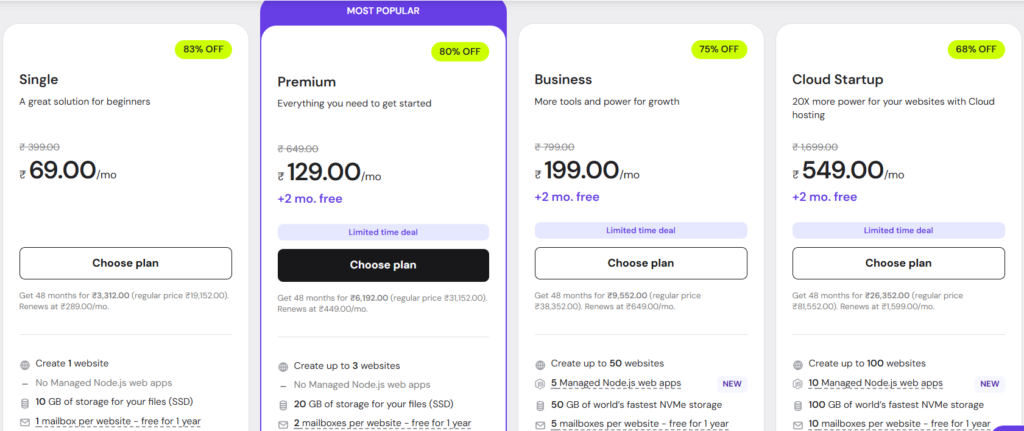
| Plan | Websites | Storage | Free Domain | Backups | Node.js | Price / Month* |
|---|---|---|---|---|---|---|
| Single | 1 | 10 GB SSD | No | Weekly | No | ₹69 |
| Premium | 3 | 20 GB SSD | Yes (1 yr) | Weekly | No | ₹129 |
| Business | 50 | 50 GB NVMe | Yes (1 yr) | Daily | Yes | ₹199 |
| Cloud Startup | 100 | 100 GB NVMe | Yes | Daily | Yes | ₹549 |
*Prices are based on a 48-month plan. GST extra. Renewal rates are higher.
Payment Methods
Hostinger supports secure and convenient payment options:
- Credit/Debit Cards (Visa, MasterCard, RuPay)
- UPI and Net Banking (India)
- PayPal
- Discover, Diners Club, and other global cards
All plans include a 30-day money-back guarantee, allowing risk-free purchase.
Ease of Use and Control Panel (hPanel)
Unlike many hosting providers that use cPanel, Hostinger offers hPanel, a custom-built dashboard. It is visually clean, fast, and beginner-friendly. You can manage files, domains, databases, emails, backups, and WordPress installations from one place without confusion.
Security and Backups
Hostinger takes website security seriously. Every plan includes:
- Free SSL certificates
- DDoS protection
- Automatic malware scanning
- Weekly or daily backups
- Two-factor authentication for accounts
These features ensure your website and data remain safe.
Customer Support and Resources
Hostinger provides:
- 24/7 live chat support
- AI assistant (Kodee) for instant answers
- Extensive knowledge base
- Video tutorials via Hostinger Academy
- Priority support for Cloud users
Support is fast and helpful, especially for beginners who may need guidance.
Who Should Use Hostinger?
Hostinger is ideal for:
- Beginners creating their first website
- Bloggers and content creators
- Freelancers and agencies managing multiple sites
- Small businesses needing professional email and domain
- Developers building Node.js or WordPress projects
- Ecommerce store owners
Pros and Cons of Hostinger
Pros:
- Very affordable long-term pricing
- Fast NVMe/SSD performance
- Free domain and SSL
- AI website builder
- Easy control panel
- Good customer support
Cons:
- Renewal prices are higher
- Email and domain free only for the first year
- Best prices require long-term plans
Conclusion
Hostinger offers an excellent combination of affordability, performance, and ease of use. With AI tools, fast servers, free SSL, and beginner-friendly management, it is one of the best choices for hosting websites in 2026. Whether you are starting a blog, business site, portfolio, or ecommerce store, Hostinger provides reliable infrastructure at a budget-friendly price.
The Premium and Business plans are the most recommended for most users due to their balanced features and cost.
FAQs
1. What makes Hostinger different from other web hosts?
Hostinger offers lower entry prices with competitive performance, an easy-to-use control panel (hPanel), AI tools, free SSL, and domain options—making it ideal for beginners and growing websites.
2. Can I start with the cheapest plan and upgrade later?
Yes, you can start with a basic plan and upgrade as your site grows. However, long-term deals are much cheaper if you commit upfront.
3. Does Hostinger support eCommerce websites?
Yes! Hostinger supports WordPress + WooCommerce, and higher plans include enough storage, speed, and security for small to medium online stores.
4. Will my website stay fast even with more traffic?
Yes—Hostinger uses NVMe/SSD storage, CDN support, and performance caching, so sites stay fast as traffic increases, and you can scale plans as needed.